Turn your ideas into something you can show
You can picture the flowers. You love the linens. Now you want to see the whole room together.
A wedding venue mockup gives you a visual starting point for that conversation. Begin with a photo of your ceremony or reception space, create a decorating concept and save the version that helps you explain what you want.
Perhaps you want to show your florist how soft pink flowers could feel against burgundy chairs. Or you want your decorator to understand why you keep coming back to pale blue table linens. Having a picture of the overall direction makes it easier to talk through those choices.
What is a wedding venue mockup?
A wedding venue mockup is a visual preview of a decorating idea in a venue. It might be a sketch, a photo with design elements added or an AI-generated concept based on a venue photograph. It helps you discuss the look you want before the physical setup is finalized.
This guide covers an AI photo-based mockup. You can create your first venue design free in WeddingDecor.com Design Studio, with an account and no credit card required.
A venue photo gives the idea somewhere to belong
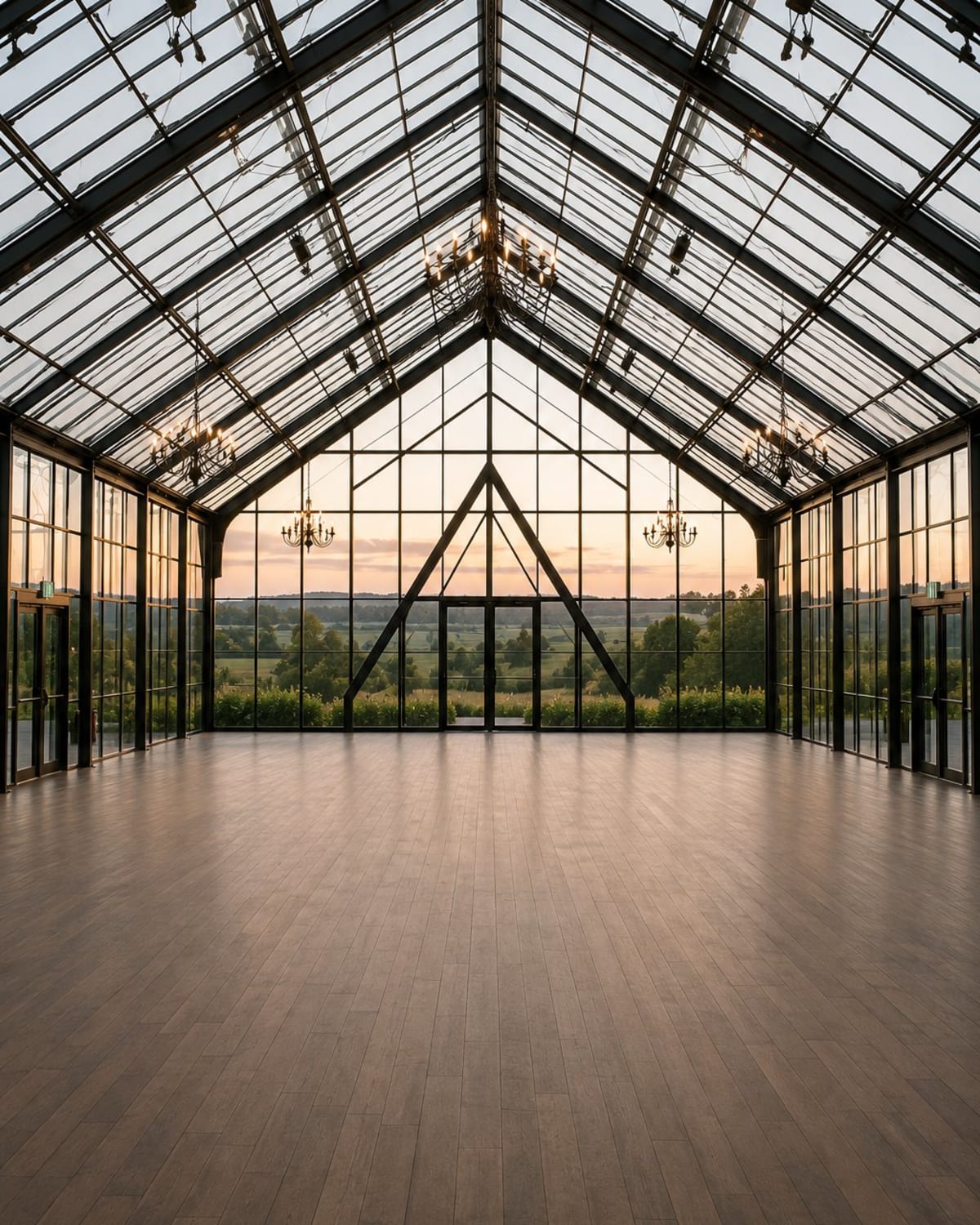
Look at this existing Design Studio glasshouse example. In the decorated concept, blue linens bring color across the reception tables, while the lighter flowers sit against the venue’s glass roof and surrounding greenery. Seeing those choices together gives you more context than a close-up of a single centerpiece.
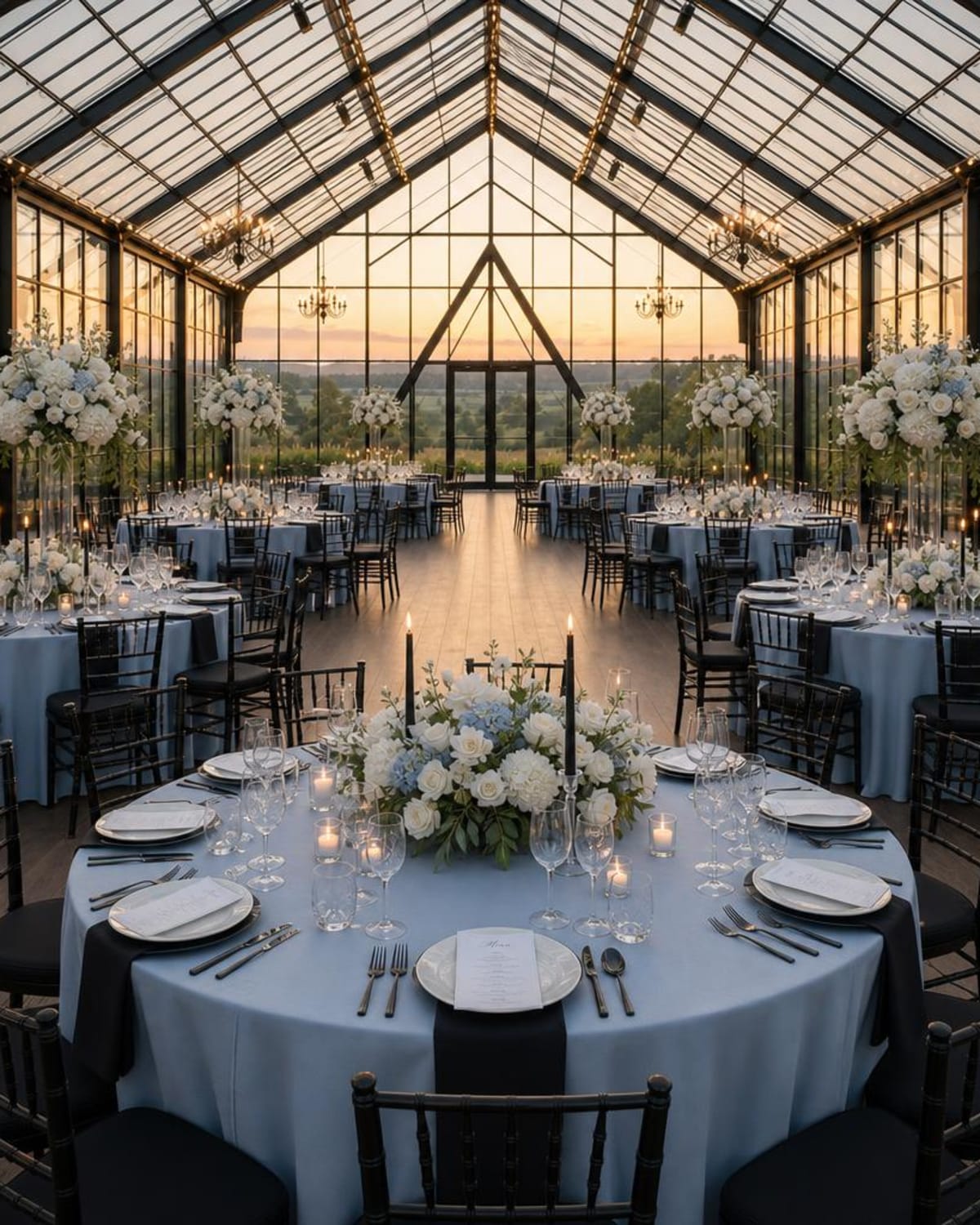
Turn what you notice into a preference: “I love the blue linens with the lighter flowers. I would like to keep that feeling, but I am flexible about the flower varieties.”
That gives your suppliers something specific to respond to. They can suggest available blue linens and build a floral proposal around the overall effect you like.
This is an existing AI-generated Studio example, not a new controlled test or a photograph of an installed wedding. Check the concept against the original photo. Venue details and proportions may change, and any overhead installation needs venue and vendor approval.
How to make a wedding venue mockup from your own photo
1. Choose the view that matches your question
For a reception concept, use a clear photo that shows the room and the area you want to decorate. Include the walls, floor and windows so you can consider how your colors sit against the venue.
If your question is about a ceremony arch, choose a view toward the place where you will stand. If it is about the head table, use an angle that shows the wall or backdrop behind it. An unobstructed, well-lit photo makes a useful starting point. Use your own photo or an image you have permission to use.
2. Bring the ideas you already have
In WeddingDecor.com Design Studio, inspiration images are optional. Add up to two references when you have a particular flower shape, table setting or backdrop in mind. You can also begin without them.
Style selection is optional too. You might choose Vintage, Old Money, Romance or Coastal, or try Surprise Me. Add your colors when you have a palette in mind. If you are still deciding on shades, the Wedding Color Palette Creator can help you put a combination together.
3. Create a concept and save a useful version
Upload your venue photo in the Design Studio and use the available choices to guide your first design. Look at the whole setting before zooming into the smaller details.
You are looking for an image that helps you explain a direction. With Studio Pass, you can create additional designs and request revisions. Each new venue design or revision uses one design credit, and other parts of the image may change too.
Have a venue photo? Let’s bring your ideas together.
Create a decorating concept you can save and share with your florist or decorator. Add inspiration if you have it, or start with your space.
Create My Free Venue MockupOne free venue design after creating an account. No credit card required.
Decide what you want to keep from the mockup
A design can be useful even when you would change a few details. Before sending it to anyone, compare it with your original photo and make three short notes:
- The part I love: perhaps the airy flowers, the linen color or the way the focal point draws your eye.
- The part I would change: perhaps fewer candles, a lighter chair or a simpler backdrop.
- The part I need help with: something involving availability, cost, dimensions or installation.
Keep the original venue photo alongside the concept. If the AI changes a doorway, window or other feature, your vendor needs the real photograph to understand the space you are working with.
What to send your florist or decorator
Send the original venue photo and your preferred concept together. Add your wedding date, venue, approximate guest count and the budget available for the items you are asking them to provide.
Explain which part of the image matters most to you. Here is an example of a note you could adapt:
“This is an AI concept using our venue photo. I love the blue table linens and the loose, airy flowers. The original venue photo is attached too.
Could you suggest a version using your available rentals and seasonal flowers? Our budget for the items in this request is [amount]. We are happy to adapt the floral arrangements if that works better in the room.”
Your vendor can then respond to the priorities behind the image. Ask them to confirm what their proposal includes and which details will be adapted. If you would like to see a physical sample arrangement or table setup, ask whether they offer one and what it includes.
For more help with the reception as a whole, read our wedding reception design guide. If your main question is the arch or aisle, our ceremony decor visualizer guide is a useful next step.
A digital mockup, mood board and physical sample do different jobs
| Visual reference | What it helps you discuss | What still needs checking |
|---|---|---|
| Wedding mood board | The overall colors, materials and feeling you want. | How the ideas will fit your particular venue. |
| AI venue mockup | A decorating direction using your venue photo as the starting point. | Real architecture, dimensions, quantities, products and installation. |
| Physical floral or table sample | The actual pieces and materials your supplier presents. | Which details are representative and how the complete room will be arranged. |
| Measured floor plan | Furniture placement, circulation and the layout agreed with your venue. | The decorative look and the final details your suppliers will provide. |
You may use more than one during planning. A wedding mood board can help you settle on a direction, while a venue mockup gives you a way to discuss that direction in the room.
A few common questions
Can I make a wedding venue mockup from my own photo?
Yes. WeddingDecor.com Design Studio starts with your venue photo to create an AI decorating concept. Use a clear view of the ceremony or reception area you want to work on. Inspiration images and style selection are optional.
Can I create a wedding venue mockup for free?
Your first venue design is free after creating a Design Studio account, with no credit card required. Check the current Studio Pass options when you want to create more designs.
Will the mockup show exactly what my wedding will look like?
It shows a possible visual direction. AI can change venue details, proportions and objects, and it cannot confirm real products, flower quantities or costs. Share the original photo as well as the concept, and confirm the final setup with your suppliers.
Does an AI mockup replace a florist’s sample arrangement?
They serve different purposes. An AI concept helps you communicate a decorating direction. A physical sample lets you discuss the actual flowers, materials or rental pieces your supplier presents. Ask your florist what sample options they offer and whether they would be useful for your plans.
Can I use the image to order exact flowers and rentals?
Use it to explain the shapes, colors and overall effect you like. Ask your suppliers to identify the available pieces, quantities and materials needed. The image itself is not an order list or a supplier quote.
Is a wedding venue mockup the same as a seating plan?
No. A photo-based AI decor concept does not assign seats or establish measured table spacing. Work with your venue on an appropriate floor plan and use a seating tool for guest assignments.
For help preparing your photo and reviewing a design, read how to visualize your wedding venue decor.